Guide
Tesla Dashcam Viewer & Player — View Tesla Footage Free
Use TesClip as a free online Tesla dashcam viewer and player for TeslaCam, Sentry Mode, Saved Clips, and Recent Clips. On Windows, Mac, or Linux, watch six synchronized cameras with speed, GPS, and telemetry privately in your browser.
Open TeslaCam FolderFrequently Asked Questions
Is TesClip the Tesla video viewer previously called TeslaClip?
Yes. TeslaClip became TesClip, and teslaclip.com redirects to tesclip.com. It is the same independent Tesla dashcam viewer and editor. Open your local TeslaCam folder to review footage without creating an account or uploading your source videos. TesClip is not affiliated with Tesla.
Why use a Tesla clip viewer instead of opening individual MP4 files?
An individual MP4 contains one camera view. A Tesla clip viewer groups recordings from the same event so you can review the available cameras together. In TesClip, select TeslaCam, choose a SavedClips, SentryClips or RecentClips event, then inspect synchronized views and any embedded telemetry. Keep the original filenames and folder structure when copying footage. You can trim the useful interval and export an MP4 for sharing.
Can TesClip play encrypted Tesla dashcam videos?
TesClip detects encrypted recordings and shows them as locked clips, but cannot decrypt or play them. Use Tesla’s in-car viewer or the official viewer at dashcam.tesla.com for those recordings. Unencrypted, browser-supported footage can be played locally in TesClip; available cameras and telemetry depend on the recording.
What you can do
Review every relevant camera together
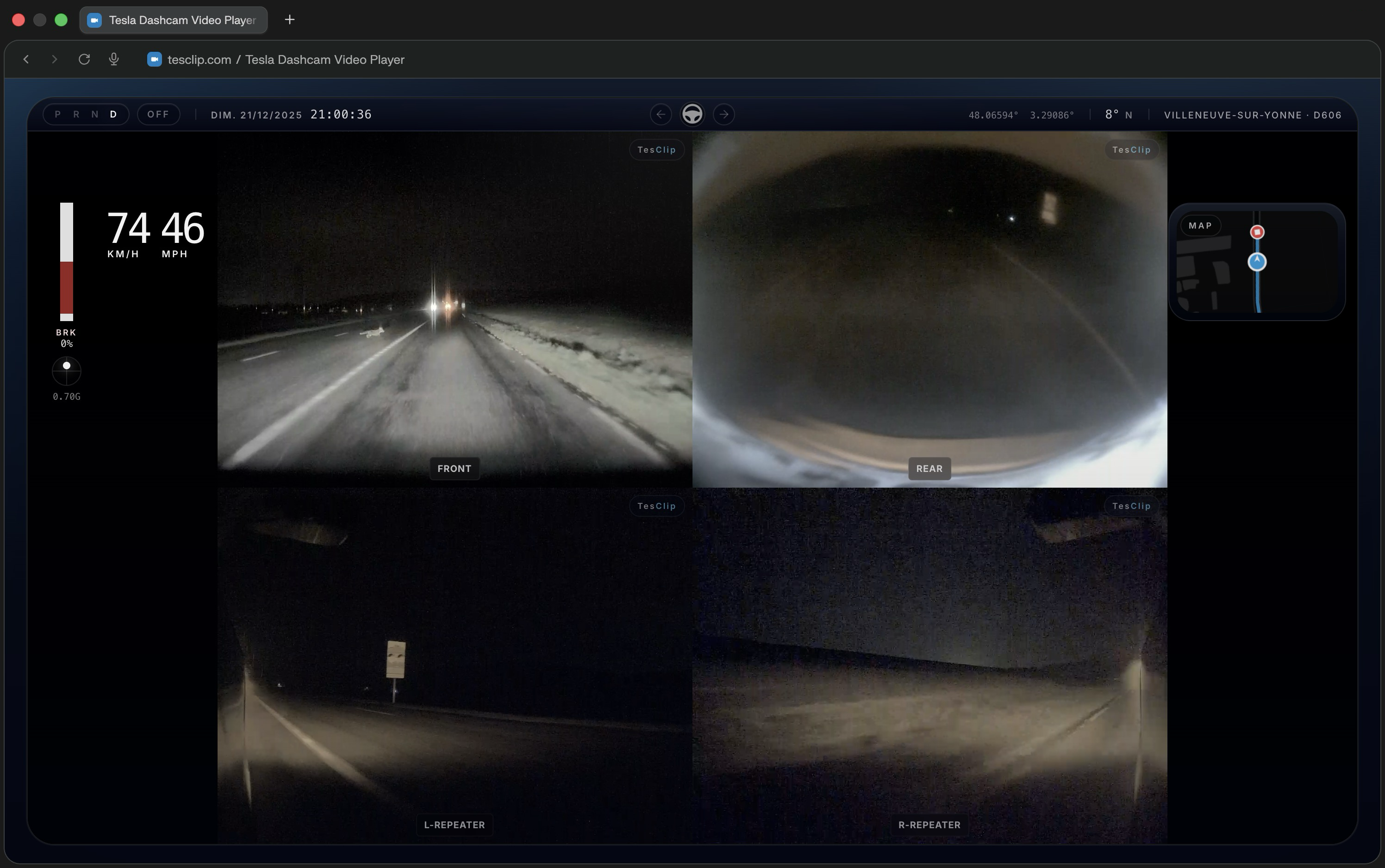
Watch front, rear, repeater, and pillar cameras in synchronized layouts so you can understand what happened around the car at a glance.
See driving data while the clip plays
Overlay speed, acceleration, steering, braking, Autopilot status, and other telemetry extracted directly from supported Tesla footage.
Understand location and route context
Follow GPS points on an interactive map and correlate motion, heading, and route changes with what the cameras recorded.
Prepare clips for review or sharing
Trim and export footage with the HUD overlay when you need to keep evidence, send a replay, or create a clearer explanation of an event.
How it works
- 1
Select your TeslaCam folder
Plug in your Tesla USB drive and choose the TeslaCam folder in TesClip. Supported browsers can remember that folder for faster access later.
- 2
Browse organized clips
TesClip scans SentryClips, SavedClips, and RecentClips, builds clip groups, and shows thumbnails and metadata so you can jump to the right event.
- 3
Play, inspect, and export
Open a clip to review synchronized cameras, telemetry, and maps, then trim and export the sequence if you need a shareable version.
Privacy first
Local processing only
TesClip processes footage locally and does not upload videos to its servers. Only an export you explicitly publish to YouTube is sent directly from your browser to Google and YouTube.
No account required
You can open, review, and export supported clips without creating an account or linking Tesla credentials.
Useful context without cloud delay
Because the analysis happens locally, you can inspect footage quickly while keeping full control over the original files.
Compatibility and limits
TesClip is designed for Tesla dashcam footage from Model 3, Model Y, Model S, Model X, and Cybertruck, and works best on desktop browsers.
- Chrome and Edge provide the best folder-selection experience because they support persistent folder permissions.
- Firefox and Safari can still open footage, but some folder memory and browser APIs are more limited.
- Mobile devices can be used for manual file access, but desktop remains the most complete experience for multi-camera review and export.
Known limitations
- Perfect frame-level sync between every camera can vary slightly because browsers do not decode multiple videos with identical timing guarantees.
- Some older Tesla firmware versions may expose less telemetry or differently structured metadata than current vehicles.
- Very large clips or long export sessions can depend heavily on available device memory and browser performance.
Ready to try TesClip?
Open your TeslaCam folder to browse clips right away, or get in touch if you need help, want to report a bug, or have an idea for improving the viewer.
Open TeslaCam FolderNeed the full overview?
How to View Tesla Dashcam Videos — TeslaCam & Sentry Clips
Simply plug your Tesla USB drive into your computer, visit TesClip.com, click 'Open TeslaCam Folder', and select your TeslaCam folder. TesClip will automatically organize and display all your videos by type (SentryClips, SavedClips, RecentClips) with thumbnails and metadata.
GuideTesla Dashcam Telemetry Viewer — Speed, GPS & Autopilot
Yes! TesClip extracts embedded telemetry data from your Tesla videos to display real-time speed, acceleration, GPS coordinates, autopilot status (FSD, Autosteer, TACC), steering angle, brake status, and more. You can also view your route on an interactive map with multiple view modes.
GuideExport Tesla Dashcam Videos — HUD, Multi-Camera & 4K
Yes. Set In/Out points, choose a single-camera or multi-camera layout, then export a downloadable MP4 from 720p to 4K with an optional telemetry HUD and dynamic GPS map. TesClip uses fast hardware-accelerated local export when the browser supports it and an automatic local fallback otherwise. Export time depends on the device, clip length, resolution, codec, and layout.
Guide